
You have no recently viewed items.


Classroom Chairs
Classroom Desks
Activity Tables
Height Adjustable Tables
Rocking Chairs & Wobble Stools
Teacher Chairs
Teacher Desks
Classroom Storage
Whiteboards
Book Racks & Book Carts
Cubby & Multi-Storage
Easels & Art Furniture
Interactive Play Furniture
Shelving & Cabinets
Daycare Furniture
Montessori Furnishings & Equipment
Office Workstations
Office Chairs
Reception Desks
Waiting Room Chairs
Filing Cabinets & Pedestals
Monitor Arms
Keyboard Trays
Lighting
Power

Classroom Furniture: Complete Guide to Designing Effective Learning Spaces
Key Takeaways
-
Classroom furniture directly impacts student focus, comfort, safety, and collaboration, it’s far more than just filling a room with desks and chairs.
-
Modern classrooms (from 2010 onward) are shifting from fixed rows to flexible, mobile, and adjustable furniture layouts that support diverse teaching methods.
-
Different age groups require different desk heights, chair sizes, and durability standards, a one-size-fits-all approach leads to discomfort and disengagement.
-
Choosing furniture that meets safety standards, supports ergonomics, and fits long-term budgets prevents costly replacements and health issues.
What Is Classroom Furniture and Why It Matters
Classroom furniture encompasses every physical element that students and teachers use throughout the school day. This includes student desks, chairs, activity tables, teacher workstations, storage units, presentation equipment, soft seating for reading corners, and specialized pieces for labs, libraries, and outdoor spaces. These items form the foundational infrastructure of any learning environment.
Research conducted since around 2015 consistently links ergonomic, flexible furniture to measurable improvements in student outcomes. Studies indicate that ergonomic upgrades correlate with 12-18% improvements in attention span, while poorly designed furniture contributes to 20-30% of student postural issues. When students are comfortable and properly supported, they spend less time fidgeting and more time engaged with teaching materials.
Furniture choices also shape pedagogy in fundamental ways. The difference between lecture-style rows and collaborative table arrangements isn’t just aesthetic, it determines how teachers teach and how students learn. A classroom set up for traditional direct instruction sends different signals than one designed for project-based learning, blended instruction, or group work.
This is a guide designed to give you a comprehensive understanding of classroom furniture. Subsequent articles will explore specific topics in greater depth, including detailed guides on selecting the ideal student desks, optimizing teacher workspaces, planning storage solutions, and designing specialty zones.
How furniture impacts different learning environments:
-
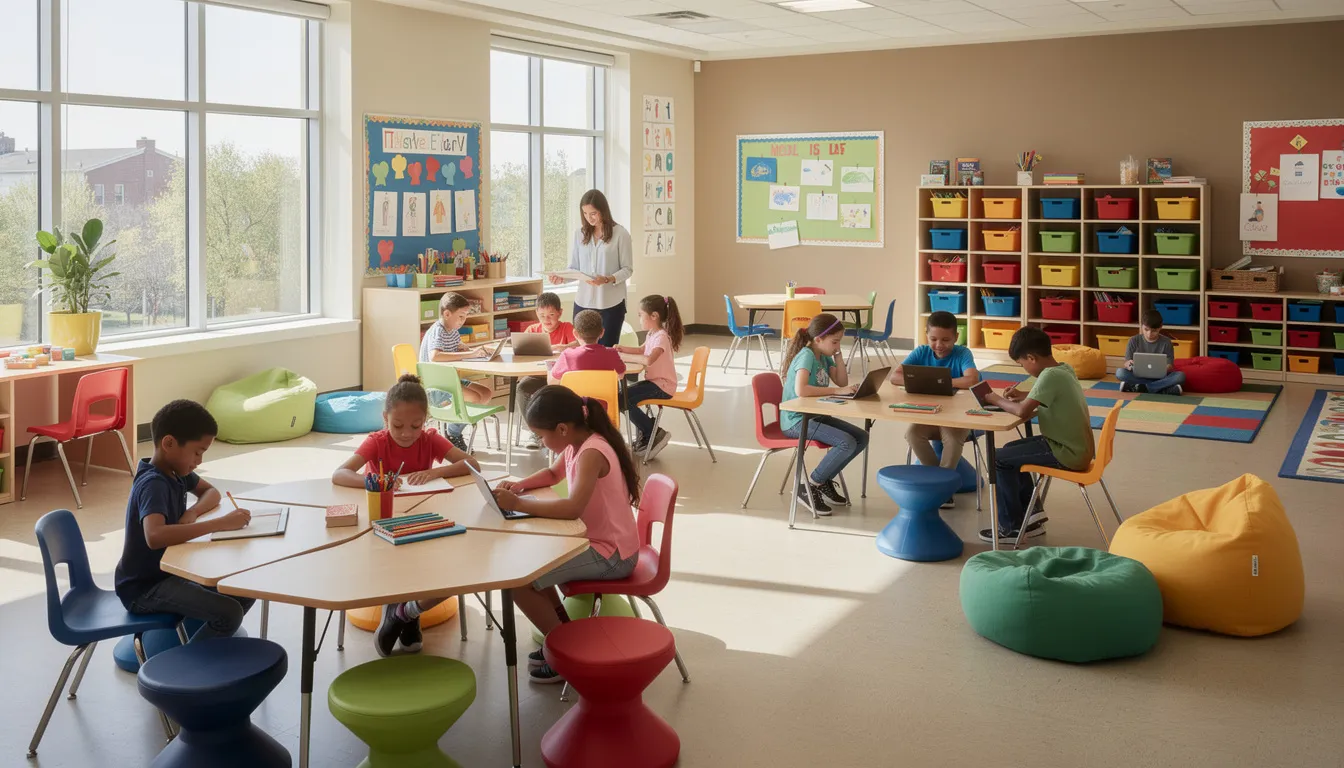
A Grade 3 classroom might feature low tables with colorful chairs, cubbies at child height for easy access, and a reading corner with soft seating to support literacy development
-
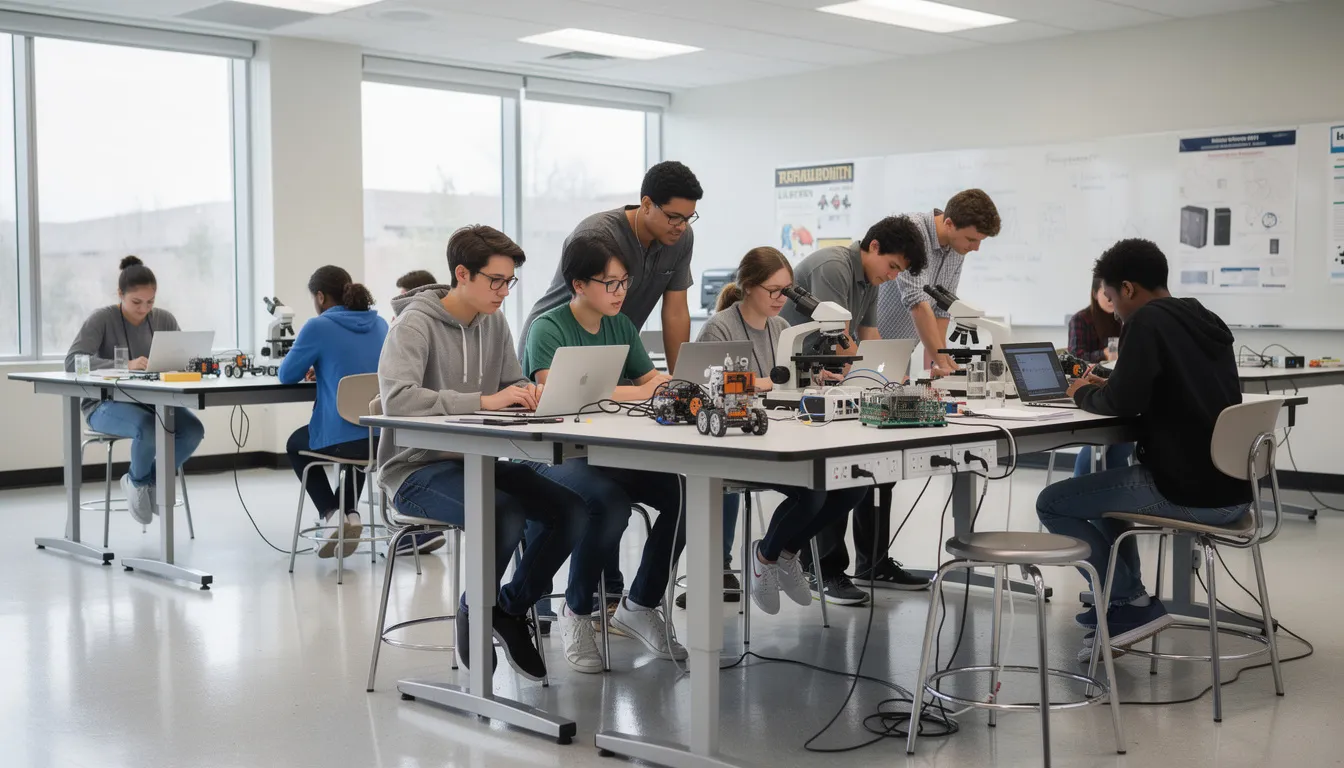
A Grade 10 science lab requires spill-resistant laminate surfaces, stools for mobility between workstations, and lockable storage for supplies and equipment
-
A middle school makerspace needs height-adjustable tables, mobile carts for project materials, and flexible seating that students can reconfigure in under five minutes
Core Types of Classroom Furniture
Before you can create an effective learning space, you need to understand the main furniture categories available. Each type serves specific functions and supports different aspects of daily classroom life.
Key classroom furniture categories:
-
Student desks: Individual work surfaces ranging from traditional rectangular units to adjustable sit-stand models
-
Student chairs: Seating options from basic four-leg chairs to ergonomic task chairs and alternative seating like wobble stools
-
Activity tables: Collaborative work surfaces in various shapes for group learning
-
Teacher desks: Workstations with storage, cable management, and space for technology
-
Storage units: Bookcases, cubbies, tote tray systems, and lockable cabinets
-
Mobile carts: Rolling units for supplies, devices, and teaching materials
-
Whiteboard cabinets: Presentation and display surfaces with integrated storage
-
Soft seating: Bean bags, cushions, and upholstered pieces for informal learning zones
Individual desks used in North American schools since the 1990s have largely given way to more collaborative options. After 2018, schools widely adopted modular activity tables that allow quick rearrangement for different learning activities. The following sections provide more detail on each major category.
Student Desks and Tables
Student desks come in three primary formats, each suited to different teaching approaches and classroom sizes.
Traditional single desks feature individual work surfaces, typically around 60x40cm, providing dedicated space for handwriting, textbooks, and devices like Chromebooks. These work well for independent study and standardized testing but limit collaboration.
Combo desk-chair units integrate seating with the work surface, saving floor space in tight layouts. These are common in older buildings or classrooms with high student density, though they offer less flexibility for rearrangement.
Shared activity tables accommodate groups of 4-6 students and have become the standard in classrooms emphasizing cooperative learning. These support the shift toward project-based instruction that accelerated after 2015.
Common table shapes adopted in 2020s classrooms:
|
Shape |
Best Use |
Group Size |
|---|---|---|
|
Rectangular |
Traditional work, testing |
2-4 students |
|
Trapezoid |
Flexible clustering, modular arrangements |
1-2 per table, combines to 6+ |
|
Kidney-shaped |
Teacher-led small groups, guided reading |
4-6 students |
|
Crescent/Horseshoe |
Discussion-based learning, seminars |
6-8 students |
|
Hexagonal |
Equal participation, peer collaboration |
6 students |
Height-adjustable desks have gained significant traction for students age 10 and older. These sit-stand options support natural movement throughout the day and can boost concentration by 15-20% according to industry research. Typical adjustment ranges run from 55-75cm to accommodate growth across grade levels.
Surface materials vary based on classroom needs. Laminate tops offer easy cleaning and resistance to scratches, stains, and common classroom substances like paints and glues. Solid wood provides a premium aesthetic for libraries or traditional settings. Markerboard tops allow students to work out problems directly on the surface and wipe clean.
Choosing the right student desk involves more than shape alone, size, mobility, storage, ergonomics, and classroom layout all affect long-term performance. For a deeper breakdown, read our Classroom Desks: A Complete Guide to Types, Functions, and Selection.
Student Seating
The right chair keeps students comfortable and focused throughout a 6-7 hour school day. The wrong one leads to fidgeting, slouching, and distraction.
Common chair types for classroom use:
-
Four-leg chairs: The traditional standard, stable and stackable, available in multiple seat heights. If you’re planning multipurpose rooms, cafeterias, or assemblies, see our Stackable Chairs for Schools guide for sizing, storage, durability specs, and what to look for.
-
Sled-base chairs: Curved base design that reduces floor scratching and allows slight rocking motion
-
Stools: Ideal for labs and makerspaces where mobility between stations is essential
-
Task chairs on casters: Offer greater adjustability and mobility, common in secondary computer labs
-
Floor seating: Cushions and rugs for early years classrooms supporting informal learning
Standard classroom chair sizes align with student age groups according to seat height:
|
Seat Height |
Typical Age Range |
Grade Level |
|---|---|---|
|
12” (30cm) |
Ages 3-5 |
Preschool/Kindergarten |
|
14” (35cm) |
Ages 6-8 |
Grades 1-3 |
|
16” (40cm) |
Ages 9-12 |
Grades 4-6 |
|
18” (45cm) |
Ages 13+ |
Grades 7-12 |
Ergonomic features make a significant difference in student comfort. Look for contoured seats that distribute weight evenly, lumbar support that maintains natural spine curvature, and flexible backrests that move with the student. Research indicates that ergonomic chairs reduce back complaints by approximately 25% compared to basic plastic stackables.
Alternative seating options have grown popular since around 2018. Wobble stools allow core engagement and subtle movement, while classroom stools can be a practical choice for labs, makerspaces, small-group zones, and flexible learning areas.
For a deeper look at sizing, safety, placement, and how to choose the right option for different school settings, read our Classroom Stools & Wobble Stools: How to Choose the Right Seating for Schools guide. Soft cubes and bean bags create inviting reading nooks that enhance creativity and motivation. These options suit students who benefit from movement and sensory input while learning.
Teacher Desks and Workstations
Teacher desks serve as command centers for instruction, organization, and administrative work. The ideal setup balances authority, efficiency, and flexibility.
Common teacher desk formats:
-
Rectangular desks: Traditional option with ample surface area for materials, grading, and technology
-
L-shaped desks: Provide expanded workspace and often include return surfaces for meetings with students
-
Mobile podium-style desks: Compact units on casters that allow teachers to position themselves anywhere in the room
Key features distinguish functional teacher workstations from basic office desks. Lockable drawers secure confidential documents and personal items. Cable management systems keep laptop chargers, projector cables, and device cords organized and out of sight. Durable worksurfaces withstand years of daily use.
Since the COVID-era shift to remote and hybrid learning beginning in 2020, teacher workspace trends have evolved. Mobile stations allow instructors to circulate among student groups rather than teaching exclusively from the front. Sit-stand options support teacher health during long days. Integrated charging keeps devices ready without cord clutter. For a deeper look at teacher desk sizes, features, classroom layout, and budgeting, read our teacher desk buying guide.
Example scenario: A high school English teacher uses a mobile desk on locking casters, moving it between student groups during workshop-style classes. The desk holds a laptop, document camera, and essential supplies. During direct instruction, it positions near the interactive display. During group work, it moves to the side, freeing space for student collaboration.
Storage, Cubbies, and Organization
Effective storage keeps classrooms functional and maximizes instructional time. When teachers and students can stay organized and access supplies quickly, less time is lost to searching for materials.
Typical classroom storage items:
-
Bookcases: Open shelving for class libraries, reference materials, and displayed student work
-
Cubbies: Individual compartments for student belongings, especially in elementary settings
-
Tote tray units: Stackable bins in frames for organizing supplies by subject, table group, or student
-
Lockers: Secure storage for secondary students’ personal items and devices
-
Mobile storage carts: Rolling units that bring supplies to work areas or store items centrally
-
Art and supply cabinets: Enclosed storage for materials that need protection or restricted access
Storage needs vary by grade level and subject:
-
K-3 classrooms: Open cubbies at child height with picture labels, low bookshelves students can browse independently, bins for manipulatives and art supplies
-
Science labs: Lockable cabinets for chemicals and equipment, open shelving for common supplies, clear containers for specimens and samples
-
STEM makerspaces: Labeled bins for project materials, tool organization on pegboards, carts for works-in-progress that need to move between sessions
Visibility and accessibility matter for younger children. Low heights and open fronts let students manage their own belongings and select materials independently. For senior grades, security becomes more important, doors with locks protect valuables and limit access to items like lab equipment.
Storage is one of the easiest ways to improve classroom flow, especially when supplies, centers, devices, and teaching materials all need clear homes. For practical organization ideas, see our guide to classroom storage ideas for supplies, centers, and activities.
Specialty and Flexible Furniture
Beyond standard desks, chairs, and storage, specialty furniture supports specific activities and enables quick room transformation.
Specialty furniture for specific learning environments:
-
Computer stations: Workbenches with integrated cable management, monitor mounts, and keyboard trays
-
Library furniture: Display shelving that showcases covers, comfortable reading chairs, quiet study carrels
-
Makerspace benches: Heavy-duty surfaces with tool storage, often height-adjustable for seated or standing work
-
Music room setups: Chair storage racks, instrument cabinets, and risers for ensemble formations
-
Art room furniture: Easels, drying racks, tables with washable surfaces and storage for works in progress
Flexible furniture enables the quick reconfiguration that modern pedagogy demands. Flip-top tables fold flat and nest together, clearing floor space within minutes. Nesting chairs stack compactly, freeing room for movement activities. Mobile whiteboards serve as writing surfaces and room dividers simultaneously. For schools planning cafeterias, commons, or cafe gymatorium spaces that need to support lunch service, assemblies, and flexible layouts, see our guide to cafeteria tables for schools.
These pieces support transitions that would be impossible with fixed furniture. A classroom can shift from lecture configuration to group work islands to testing rows in under five minutes. A capability that has become standard expectation in schools built or renovated after 2015.
Example: A middle school STEM lab features height-adjustable tables paired with stool seating. During direct instruction, tables face the front. For hands-on projects, they cluster into workstations. During presentations, they form a U-shape with the presenter at the open end. A single room supports multiple teaching modes throughout the day.
Designing the Classroom Layout
Furniture only performs as well as the layout that supports it. The overall design of your classroom determines traffic flow, sightlines, collaboration opportunities, and how effectively your teaching methods translate to student learning.
The most effective layouts consider class size, teaching style, student needs, and the physical constraints of the room itself. A wide open room offers different possibilities than a narrow space with columns or fixed cabinetry.
Three main layout types:
-
Traditional rows: Students face forward, ideal for direct instruction, lectures, and testing
-
Clusters/groups: Tables arranged for 4-6 students, supporting cooperative learning and discussion
-
U-shape/horseshoe: Students face each other and the teacher, encouraging whole-class discussion and debate
Layout planning considerations:
-
Maintain circulation paths of at least 90cm (36 inches) for main aisles and walkways
-
Ensure clear sightlines from every seat to the primary display or teaching area
-
Account for projection zones, interactive whiteboards and screens need unobstructed viewing
-
Plan device charging locations based on power outlet placement
-
Allow wheelchair access to all areas, not just designated “accessible” spots
Classrooms renovated between 2010 and 2024 increasingly prioritize flexibility. Rather than permanent arrangements, rooms feature furniture that can transition between configurations as lessons demand.
For more layout examples and planning ideas, read our Classroom Design: Layouts & Furniture That Boost Student Engagement.
Layouts for Different Teaching Styles
Your layout should serve your pedagogy, not fight against it. Different teaching methods require different spatial arrangements.
Direct instruction: Traditional rows or chevron patterns focus attention forward. All students face the teacher and display. This layout suits lectures, demonstrations, and standardized testing. It maximizes capacity but limits peer interaction.
Cooperative learning: Clusters of 4-6 desks create team workspaces. Students face each other, facilitating discussion and collaboration. This layout supports project-based learning, peer tutoring, and group problem-solving. Example: Grade 5 science groups work together on an ecosystem project, each cluster functioning as a research team.
Flipped classrooms: Varied zones allow students to work at their own pace. Some areas support quiet individual work while others enable group discussion of pre-watched content. Flexibility is essential, students move between zones based on their needs.
Blended learning: Stations rotate students through different modalities. One station might feature direct instruction with the teacher, another independent device work, and a third collaborative practice. The layout must support clear movement paths between stations.
Mobile furniture (desks and chairs on casters) allows a single room to shift between these layouts. A well-designed space can move from exam rows to group islands in under 10 minutes with student help.
Teacher sightline considerations: Since the widespread adoption of interactive displays after 2012, teachers need clear views of all students regardless of layout. Avoid tall storage or equipment that creates blind spots. Position the teacher workstation where scanning the full room is natural.
Age-Appropriate Layouts (Early Years to Secondary)
Different developmental stages require fundamentally different spatial arrangements. What works for a preschool classroom would fail in a high school physics lab.
Early childhood (ages 3-5):
-
Learning centers with low tables, open floor space, and rugs for group activities
-
Furniture at child height (typically 50-55cm tables, 30cm chairs)
-
Defined areas: dramatic play, blocks, art, reading nook with soft seating
-
Wide circulation paths to prevent collisions during movement activities
Primary (ages 6-10):
-
Mix of individual work and group tables
-
Reading corners with comfortable seating separate from desk areas
-
Student cubbies for personal items at accessible heights
-
Space for whole-class gathering on the floor or carpet
Middle school (ages 11-13):
-
Increased emphasis on collaborative table arrangements
-
Subject-specific zones (lab tables, computer stations, presentation areas)
-
Storage for larger materials as projects become more complex
-
Balance between movement and focused work
Secondary (ages 14-18):
-
Subject-specific layouts dominate: rows for lecture halls, lab tables for sciences, seminar arrangements for discussion courses
-
Stool seating in labs for mobility between workstations
-
Increased technology integration with power access at each station
-
Furniture sized for adult bodies (18” chair heights, 73cm desk heights)
Consistent requirements across all ages:
-
Safe, clear movement paths that prevent trips and collisions
-
Designated space for backpacks that doesn’t obstruct aisles
-
Wheelchair access throughout, not just to specific “accessible” locations
-
Flexibility to adapt as class sizes and teaching methods change
Ergonomics and Student Wellbeing
Ergonomics means fitting furniture to the student rather than forcing students to adapt to poorly sized furniture. When the fit is right, students can focus on learning instead of discomfort.
Since the early 2000s, educators and health professionals have documented common ergonomic problems in schools. Students slouch because chairs don’t support their backs. They strain their necks looking at desks that are too high or too low. They fidget because their feet dangle or their legs are cramped.
Common ergonomic issues and their causes:
|
Problem |
Typical Cause |
Consequence |
|---|---|---|
|
Slouching |
Chair back too straight or too far from desk |
Lower back pain, fatigue |
|
Neck strain |
Desk too high or too low for writing |
Headaches, difficulty concentrating |
|
Fidgeting |
Feet dangling, unable to rest flat |
Distraction, disruption to others |
|
Shoulder tension |
Desk surface too high for natural arm position |
Upper body fatigue, reduced handwriting endurance |
Movement-friendly furniture addresses these issues while recognizing that stillness isn’t natural for developing bodies. Wobble stools allow core engagement without leaving the seat. Perch stools enable supported standing. Sit-stand desks let students change position throughout the day.
Practical tips for teachers:
-
Observe students during independent work show signs of discomfort include frequent position changes, leaning, and reaching
-
Ensure students can place feet flat on the floor or a footrest
-
Check that desk height allows elbows to rest at roughly 90 degrees when writing
-
Offer position variety through different seating zones or standing options
Matching Furniture Size to Student Body Size
Correct sizing prevents the postural problems that accumulate over years of schooling. Standards like EN 1729 in Europe provide sizing codes that match furniture dimensions to student height ranges.
How to choose correct sizes:
-
Measure student height or use age as a general guide
-
Select chair seat height that allows feet to rest flat with thighs parallel to floor
-
Choose desk height that positions the writing surface at elbow height when seated
Typical age, height, and furniture size pairings:
|
Age Range |
Height Range |
Seat Height |
Desk Height |
|---|---|---|---|
|
4-6 years |
100-115cm |
26-30cm |
46-52cm |
|
6-8 years |
115-130cm |
30-34cm |
52-58cm |
|
8-11 years |
130-145cm |
34-38cm |
58-64cm |
|
11-14 years |
145-160cm |
38-42cm |
64-70cm |
|
14+ years |
160-175cm+ |
42-46cm |
70-76cm |
Multi-grade or mixed-age classrooms require either adjustable furniture or a variety of sizes available simultaneously. Adjustable-height desks and chairs, while more expensive upfront (sometimes 2x the cost of fixed options), eliminate the need to stock multiple size ranges.
Consequences of incorrect sizing:
-
Chair too high: Feet dangle, pressure under thighs reduces circulation, student leans forward to compensate
-
Chair too low: Knees higher than hips, spine rounds, student slouches
-
Desk too high: Shoulders hunch, arms tire quickly during writing tasks
-
Desk too low: Student bends forward, straining neck and back
Encouraging Healthy Movement in Class
Modern classroom furniture increasingly supports micro-movements rather than enforcing total stillness. The understanding that children need to move and that movement actually supports rather than hinders learning has reshaped furniture design since 2015.
Movement-positive furniture options:
-
Standing desks: Allow students to work on their feet, often with anti-fatigue mats
-
Rocking stools: Enable gentle movement while maintaining seated position
-
Wobble cushions: Add instability to standard chairs, engaging core muscles
-
Swivel seats: Allow rotation without disrupting neighbors
-
Mobile chairs on casters: Let students reposition easily for collaboration
Research supports these approaches. Standing desks can boost concentration and reduce the physical effects of prolonged sitting. Movement helps regulate attention, particularly for students ages 7-12 who naturally need more physical activity than older learners.
Sample classroom routines that incorporate movement:
-
Rotate between seated and standing work zones every 20-30 minutes
-
Designate “movement seating” areas for students who benefit from wobble options
-
Use furniture transitions (rearranging desks for group work) as built-in movement breaks
-
Allow standing during whole-class discussions for students who prefer it
This topic connects to inclusive design, many students with attention differences or sensory needs benefit significantly from movement opportunities. Future cluster articles will explore active classrooms and neurodiversity-friendly learning spaces in greater depth.
For more on how furniture fit affects posture, comfort, and focus, see The Science Behind Ergonomic Classrooms: How Proper Furniture Boosts Student Learning and Well-Being.
Materials, Durability, and Maintenance
The materials used in classroom furniture determine how long it lasts, how it performs under heavy use, and how easily it can be maintained. Schools typically plan for furniture lifespans of 10-15 years, making durability a critical factor in purchasing decisions.
Post-2020 hygiene standards have influenced material selection. Surfaces must withstand frequent cleaning with disinfectants without degrading. Smooth, non-porous finishes have become standard expectations rather than premium upgrades.
Key material considerations:
-
Resistance: How well does the surface resist scratches, stains, chips, and impact?
-
Cleanability: Can it be wiped down quickly with standard cleaning products?
-
Weight: Is the furniture light enough for students and teachers to move?
-
Repairability: Can damaged components be replaced, or must the entire unit be discarded?
-
Sustainability: What environmental impact do materials have over their lifecycle?
High-traffic primary classrooms present the greatest durability challenges. Furniture endures use by 30+ students over nine months annually, repeated moving and stacking, spills, and the general energy of young children. Materials must perform under these demands for a decade or more.
Common Classroom Furniture Materials
Understanding material options helps you compare products and select the best fit for your specific environment.
High-pressure laminate (HPL):
-
Cost-effective and widely available
-
Excellent resistance to scratches, stains, and moisture
-
Available in numerous colors and patterns
-
Ideal for desk tops, table surfaces, and cabinet faces
Melamine:
-
Lower cost alternative to HPL
-
Good for low-wear applications like storage interiors
-
Less resistant to heavy impact and moisture than HPL
-
Suitable for tote trays and shelving surfaces
Powder-coated steel:
-
Extremely durable for frames and legs
-
Resistant to chipping and rust when coating is intact
-
Available in a wide variety of colors
-
Common for chair frames, table legs, and shelving supports
Polypropylene:
-
Lightweight and easy to clean
-
Common for chair shells, especially in elementary settings
-
Resistant to most cleaning chemicals
-
Stack-friendly for storage
-
Costs approximately 30-50% less than wood equivalents
Plywood and solid hardwood:
-
Premium aesthetic, warm and natural appearance
-
Exceptionally durable with proper finishing
-
Heavier than alternatives, limiting mobility
-
Ideal for libraries, administrative spaces, and traditional settings
-
Lifespan can exceed 20 years with proper care
Material selection by environment:
|
Environment |
Recommended Materials |
Reason |
|---|---|---|
|
Art rooms |
Chemical-resistant laminate, washable surfaces |
Exposure to paints, adhesives, solvents |
|
Science labs |
Metal frames, HPL tops |
Strength, spill resistance, easy decontamination |
|
Early years |
Polypropylene chairs, rounded edges |
Lightweight, safe, easy to clean |
|
Libraries |
Solid wood, premium laminates |
Aesthetic appeal, long lifespan |
|
Computer labs |
Laminate with cable management |
Durability, cord organization |
Cleaning, Hygiene, and Long-Term Care
Classroom furniture must support the cleaning routines that keep students and staff healthy. This became especially clear during and after 2020, when heightened hygiene protocols became standard.
Cleaning frequency expectations:
-
Daily wipe-downs of all desk and table surfaces
-
Daily or every-other-day cleaning of chair seats and backs
-
Weekly deep cleaning of storage interiors and less-touched surfaces
-
Immediate spot cleaning for spills and visible soiling
Cleaning-friendly furniture features:
-
Sealed edges that prevent moisture penetration
-
Rounded corners without dirt-catching grooves
-
Smooth surfaces without texture that traps debris
-
Moisture-resistant finishes that don’t degrade from cleaning products
-
Colors and patterns that don’t show every mark (mid-tones often work best)
Cleaning agent compatibility:
-
Most laminates tolerate standard disinfectants and all-purpose cleaners
-
Avoid abrasive cleaners on any surface, they damage protective finishes
-
Test new cleaning products on inconspicuous areas first
-
Polypropylene handles most cleaning chemicals without damage
-
Wood surfaces may require specific products to maintain finish integrity
Routine maintenance checklist for facility managers:
-
Check for loose screws and tighten monthly or as needed
-
Inspect glides and casters for wear, replace before they damage floors
-
Look for cracks in plastic components, especially at stress points
-
Verify that adjustable mechanisms (height adjusters, tilts) still function
-
Document damage requiring repair or replacement
-
Schedule comprehensive inspection at least once per term
Safety, Standards, and Accessibility
Classroom furniture must meet safety regulations and inclusive design principles, not just look attractive in a catalog. Safety oversights can lead to injuries, while accessibility failures exclude students who deserve full participation.
Relevant standards by region:
-
Europe: EN 1729 covers ergonomic requirements and sizing for classroom furniture
-
North America: ANSI/BIFMA standards address durability, stability, and safety testing
-
International: ISO standards provide baseline requirements recognized globally
Key safety considerations:
-
Stability: Furniture should not tip under normal use or when students lean on it
-
Load capacity: Chairs and desks must support expected weights with safety margins
-
Edges: Rounded corners and edge banding minimize injury risks
-
Finishes: Non-toxic materials that don’t off-gas harmful chemicals
-
Moving parts: Pinch-free mechanisms on folding, adjusting, and reclining components
Accessibility requirements draw from laws like the Americans with Disabilities Act (ADA), enacted in 1990 and still the primary reference in the United States. Similar legislation exists in other countries. These aren’t just legal requirements, they ensure every student can learn effectively.
Safety Features to Look For
When evaluating classroom furniture, specific safety features indicate quality manufacturing and appropriate design for educational settings.
Concrete safety features to verify:
-
Anti-tip frames with wide bases or weighted construction
-
Secure welds with no sharp edges or exposed metal
-
Locking casters on mobile units that prevent unintended rolling
-
Pinch-free mechanisms on folding tables and adjustable components
-
Rounded corners and edge banding on all surfaces students touch
Weight ratings matter:
-
Standard classroom chairs should support at least 110kg (250 lbs)
-
Activity tables need load ratings appropriate for leaning and sitting on edges
-
Teacher desks require higher capacity to accommodate equipment weight
-
Secondary and adult education furniture needs adult weight ratings
Manufacturer testing details to request:
-
Cycle testing for adjustable mechanisms (50,000+ cycles indicates durability)
-
Load testing results showing maximum safe weight
-
Stability testing documenting resistance to tipping
-
Chemical emissions testing for indoor air quality compliance
Quick visual checks teachers can perform:
-
Does the furniture wobble when pushed or leaned on?
-
Are any bolts loose or screws protruding?
-
Are there cracks in plastic shells, especially at connection points?
-
Do chair backs flex excessively when pressure is applied?
-
Are edges rough or peeling?
Any “yes” answer indicates furniture that needs repair or replacement before student use.
Accessibility and Inclusive Design
Accessible furniture ensures that students with mobility, sensory, or posture needs can participate fully alongside their peers. Inclusive design benefits everyone and include features that help students with disabilities often improve the experience for all users.
Physical accessibility features:
-
Height-adjustable tables that accommodate wheelchairs (clear knee space of at least 68cm underneath)
-
Unobstructed approach zones that allow wheelchair, walker, or crutch users to reach their seats
-
Chairs with armrests that provide support for students who need help with stability
-
Desk surfaces at varied heights to serve standing and seated students
-
Wide aisles that exceed minimum requirements for comfortable navigation
Considerations for neurodivergent students:
-
Quieter glides that reduce noise during furniture movement
-
Defined personal spaces with clear boundaries between seating areas
-
Low-stimulation zones with neutral colors and reduced visual clutter
-
Seating options that allow movement for students who need sensory input
-
Furniture placement that creates predictable, consistent routines
Example inclusive layout: A middle school classroom features a mix of standard desks and height-adjustable tables. Two stations accommodate wheelchair users with full knee clearance and positioning that allows equal participation in group work. A quiet corner with soft seating and reduced visual stimulation provides a regulation space. Wide main aisles allow students using mobility devices to circulate freely among all peer groups.
If you’re planning spaces for students with mobility, sensory, or adaptive seating needs, read our guide to Designing Classrooms with Inclusive Furniture for Special Needs Students.

Budgeting, Procurement, and Lifecycle Planning
Furniture investments require careful financial planning that accounts for more than just purchase prices. The true cost includes delivery, installation, maintenance, repair, and eventual replacement. Smart procurement considers a 5-15 year horizon.
Initial cost vs. total cost of ownership:
A cheaper chair that needs replacement in five years costs more over a decade than a quality chair that lasts fifteen. Factor in:
-
Purchase price
-
Delivery and installation fees
-
Maintenance costs (replacement glides, repairs)
-
Cleaning and care supplies
-
Disposal or recycling at end of life
-
Replacement costs and frequency
Typical procurement timelines:
-
Most school districts begin procurement 6-9 months before the start of the school year
-
Large orders or custom specifications require longer lead times
-
Budget approval cycles may add months to the planning process
-
Summer installation requires orders finalized by spring
Phased upgrade approaches: Rather than replacing everything at once, which strains budgets and creates logistical nightmares, many districts upgrade 25-30% of furniture annually. This spreads costs, maintains consistency, and allows learning from each phase before the next.
Setting Priorities and Phasing Upgrades
Not all furniture demands equal urgency. A phased approach lets you address the most critical needs first while planning for comprehensive improvement over time.
Priority order for upgrades:
-
Safety issues: Replace anything broken, unstable, or posing injury risk immediately
-
Ergonomic failures: Address severe sizing mismatches causing documented student discomfort
-
Flexibility needs: Add mobile pieces that enable modern teaching methods
-
Technology integration: Update for device charging and cable management
-
Aesthetic refresh: Replace worn but functional items last
Example three-year phasing plan:
|
Year |
Focus |
Rationale |
|---|---|---|
|
Year 1 |
All student seating |
Addresses daily ergonomic impact, visible improvement |
|
Year 2 |
Student desks and activity tables |
Completes student workstation upgrade |
|
Year 3 |
Storage, teacher workstations, specialty items |
Supports organization and instruction |
Pilot classroom strategy: Before committing to large-scale purchases, test new furniture in one classroom per grade band. Gather data on:
-
Teacher satisfaction and ease of use
-
Student feedback on comfort and functionality
-
Behavior observations (attention, movement patterns)
-
Maintenance issues that emerge
-
Reconfiguration practicality
This data supports future funding requests and prevents expensive mistakes. When administrators can show that a pilot classroom improved attendance or reduced disciplinary incidents, budget approvals become easier.
Working With Vendors and Evaluating Options
Effective vendor relationships and thorough product evaluation prevent purchasing regrets. Take time to research before committing.
Key questions to ask suppliers:
-
What is the warranty length and what does it cover?
-
What are typical lead times for standard and custom orders?
-
Is installation included, or what are installation costs?
-
What is the repair or replacement policy for defective items?
-
Can you provide references from schools with similar needs?
-
What discounts are available for volume orders or educational institutions?
Due diligence steps:
-
Visit showrooms to see and test furniture in person
-
Request samples of materials and finishes
-
Visit reference installations in schools built or refurnished after 2015
-
Have teachers and students interact with samples before ordering
Digital planning tools: Many vendors offer 3D room planners or AR apps that let you visualize furniture layouts before ordering. These tools help you:
-
Verify that pieces fit in your actual room dimensions
-
Experiment with different configurations
-
Share proposals with stakeholders for feedback
-
Avoid ordering furniture that won’t work in your space
Comparison best practices:
-
Obtain quotes from at least three vendors for equivalent products
-
Ensure all quotes include delivery, installation, and applicable fees
-
Verify that all options meet required safety and educational standards
-
Consider total cost of ownership, not just initial price
Example: A suburban elementary school partnered with a regional furniture vendor who provided free space planning, installed a pilot classroom at reduced cost, and offered phased ordering with price protection. After successful pilot results, the school completed full classroom updates over three years with consistent product lines and priority scheduling.
Trends in Classroom Furniture (2015–2025)
The past decade has transformed classroom furniture from static infrastructure to dynamic tools that actively support learning. Understanding these trends helps you make investments that will remain relevant through 2030 and beyond.
Major trends shaping classroom furniture:
-
Flexible learning environments that support multiple teaching modes
-
Technology integration as a baseline expectation rather than an upgrade
-
Sustainable materials and lifecycle-conscious design
-
Post-2020 emphasis on hygiene, reconfigurability, and hybrid learning support
Industry data shows that 70% of schools now prioritize collaboration tables over traditional individual desks, a 40% shift from row-based classrooms since 2015.
Flexible and Multi-Use Learning Spaces
The move from fixed desks in rows to dynamic, reconfigurable spaces has been the defining trend of the past decade. Modern classrooms support transformation throughout the day.
Characteristics of flexible learning spaces:
-
Furniture that moves easily (casters, lightweight materials, handles)
-
Multiple configuration options for the same room
-
Quick transitions (under 5 minutes) between layouts
-
Storage that supports rather than hinders flexibility
Multi-use furniture examples:
-
Flip-top tables: Writing surface folds to vertical, tables nest for compact storage
-
Stacking and nesting chairs: Reduce to fraction of floor space when not needed
-
Mobile whiteboards: Serve as writing surfaces, presentation boards, and room dividers
-
Modular storage: Rolling units that create zones or clear when needed
A typical day in a flexible middle school classroom:
|
Time |
Configuration |
Furniture Position |
|---|---|---|
|
8:00 AM |
Opening discussion |
Desks in large circle |
|
8:45 AM |
Direct instruction |
Rows facing display |
|
9:30 AM |
Group project work |
Clusters of 4-5 desks |
|
10:30 AM |
Individual assessment |
Separated rows |
|
11:15 AM |
Peer review |
Paired desks facing each other |
New-build schools after 2018 increasingly design “learning commons” with furniture that supports both large gatherings and intimate small groups. Walls may be movable, furniture is uniformly mobile, and storage integrates seamlessly with instruction.
For more ideas on flexible learning environments, see our posts on flexible classrooms and designing effective K-12 learning environment spaces.
Technology-Ready Furniture
The explosion of 1:1 device programs and interactive technology since the mid-2010s has made tech integration a furniture requirement rather than an optional feature.
Technology-ready furniture features:
-
Cable management channels that hide cords and prevent trip hazards
-
Built-in power outlets and USB ports at student workstations
-
Tablet and laptop shelves integrated into desk designs
-
Monitor mounts for computer labs and media production spaces
-
Charging stations that accommodate class sets of devices
Technology integration examples:
-
Secondary ICT labs with computer benches featuring cable trays, monitor arms, and CPU storage
-
Middle school classrooms with power access at each table cluster for device charging
-
Elementary rooms with charging carts that roll between classrooms and store securely
Managing cord clutter:
-
Select furniture with integrated channels rather than adding aftermarket solutions
-
Plan outlet locations during room design, not as an afterthought
-
Use wireless charging where devices support it
-
Consider furniture with built-in power strips that eliminate floor cords
Future-proofing considerations: Devices change every 3-5 years. Furniture should accommodate:
-
Varying device sizes (tablets, laptops, larger devices)
-
Changing connector types (USB-A, USB-C, wireless)
-
Evolving power needs
-
Unknown future technologies
Furniture with open cable management and modular power systems adapts better than pieces with fixed, device-specific features.
For school libraries and media centers, our Library Learning Commons guide covers seating, tech integration, and study-zone planning.
Sustainability and Environmental Considerations
Environmental responsibility has become a purchasing priority for school districts, with roughly 60% of schools now actively seeking recycled content in furniture purchases.
Sustainable material options:
-
Low-VOC finishes that don’t off-gas harmful chemicals
-
Recycled plastic in chair shells and components
-
FSC-certified wood from responsibly managed forests
-
Steel with high recycled content
-
Furniture designed for disassembly and recycling at end of life
Sustainability certifications to look for:
-
GREENGUARD certification for low chemical emissions
-
BIFMA LEVEL certification for overall sustainability
-
FSC certification for wood products
-
Recycled content percentages in product specifications
Long-term sustainability benefits: Durable, repairable furniture is inherently more sustainable than cheap items requiring frequent replacement. A quality chair lasting 15 years has less environmental impact than three budget chairs over the same period, even if the budget chairs use some recycled materials.
Example: A large urban school district adopted a sustainability policy requiring all new furniture purchases to meet GREENGUARD certification, contain minimum 30% recycled content, and come from manufacturers with take-back or recycling programs. Over five years, they reduced furniture waste by 40% while improving classroom air quality.
How to Start Planning Your Classroom Furniture Project
Whether you’re outfitting a new building or refreshing tired existing spaces, a structured planning process leads to better outcomes. Here’s a step-by-step overview to get started.
Step 1: Assess current furniture
-
Inventory existing pieces by type, condition, and location
-
Document safety issues requiring immediate attention
-
Identify items that can be repurposed or redistributed
-
Photograph problem areas and successful arrangements
Step 2: Gather feedback
-
Survey teachers about what works and what frustrates them
-
Ask students (age-appropriately) about comfort and functionality
-
Consult specialists who work with students with disabilities
-
Review incident reports for furniture-related safety issues
Step 3: Define educational goals
-
What teaching methods do you want furniture to support?
-
Are you moving toward more collaborative, flexible instruction?
-
What technology integration needs exist now and in 5 years?
-
How will furniture support your strategic plan?
Step 4: Measure and document rooms
-
Create accurate floor plans with dimensions
-
Note fixed elements: doors, windows, outlets, displays
-
Identify constraints: columns, built-in storage, unusual shapes
-
Calculate available square footage for furniture
Step 5: Set budgets and timelines
-
Determine total available funding and annual allocations
-
Plan for delivery and installation timing
-
Build in contingency for unexpected needs
-
Identify potential grant or bond funding sources
Step 6: Create a phased implementation plan
-
Prioritize based on safety, need, and educational impact
-
Start with pilot classrooms before full rollout
-
Schedule purchases to align with procurement timelines
-
Plan for staff training on new furniture use
Simple planning tools:
-
Floor plan sketches (even hand-drawn) clarify spatial constraints
-
Furniture inventory spreadsheets track what you have
-
Photo documentation shows current conditions and inspires improvements
-
Feedback surveys capture stakeholder input systematically
Starting with one pilot classroom per grade band provides real-world data before major investments. When you can demonstrate measurable improvements in a pilot, securing funding for expansion becomes far easier.
FAQ: Classroom Furniture
The following questions address common concerns not fully covered in the main sections, offering practical guidance for school leaders and teachers making furniture decisions.
How often should classroom furniture be replaced?
Well-made classroom furniture typically has a planned lifespan of 10-15 years, with seating sometimes requiring replacement sooner (around 8-12 years) in high-use schools. However, replacement timing should depend on visible wear, safety issues, and evolving teaching methods, not just calendar age.
Conduct structured reviews every 3-5 years to assess whether furniture should be repaired, repurposed, or replaced. A chair in good condition after 12 years may have many more years of service, while a newer piece showing safety concerns should be removed immediately.
Can I mix old and new furniture in the same classroom?
Mixing is common and often necessary due to budget constraints. The key is maintaining consistency in height, safety standards, and functionality. Students should not have dramatically different experiences based on which desk they’re assigned.
Group similar pieces together to avoid having some students at desks six inches higher than their neighbors. Prioritize alignment around main teaching layouts and ensure all pieces, old and new meet current safety standards. Phase out mismatched items as budget allows.
What is the typical lead time for classroom furniture orders?
Typical lead times range from 4-12 weeks depending on supplier, customization level, and ordering season. Standard stock items ship faster; custom finishes, sizes, or configurations extend timelines significantly.
For August-September installations, order between January and April to ensure delivery and installation during summer break. Confirm delivery and installation timelines early, especially for large projects. Build buffer time into your schedule, supply chain issues can add 2-4 weeks unexpectedly.
How many extra chairs and desks should a school keep on hand?
Maintain a reserve of approximately 5-10% of total classroom capacity. For a school with 500 student stations, keep 25-50 spare chairs and desks available for new enrollments, breakage replacement, and classroom adjustments.
Store reserves in a central, accessible location so classrooms can be adjusted quickly at term start. Check stored furniture periodically to ensure it remains safe, clean, and functional, don’t discover that your spare chairs have cracked seats on the first day of school.
What should I prioritize if my furniture budget is very limited?
Safety and ergonomics come first. Replace any broken, unstable, or clearly unsafe furniture immediately. Address severe sizing mismatches that cause documented student discomfort. these affect learning every day.
Low-cost layout changes can improve functionality without purchasing anything new. Simply rearranging existing pieces for better sightlines, collaboration, or traffic flow costs nothing. If buying something, prioritize a few mobile items like flip-top tables that add flexibility without requiring full classroom replacement.
Develop a multi-year upgrade strategy rather than spreading limited funds too thin. Focus each year on one category, chairs in year one, desks in year two, storage in year three, to make meaningful progress while staying within budget.
- Choosing a selection results in a full page refresh.


!